





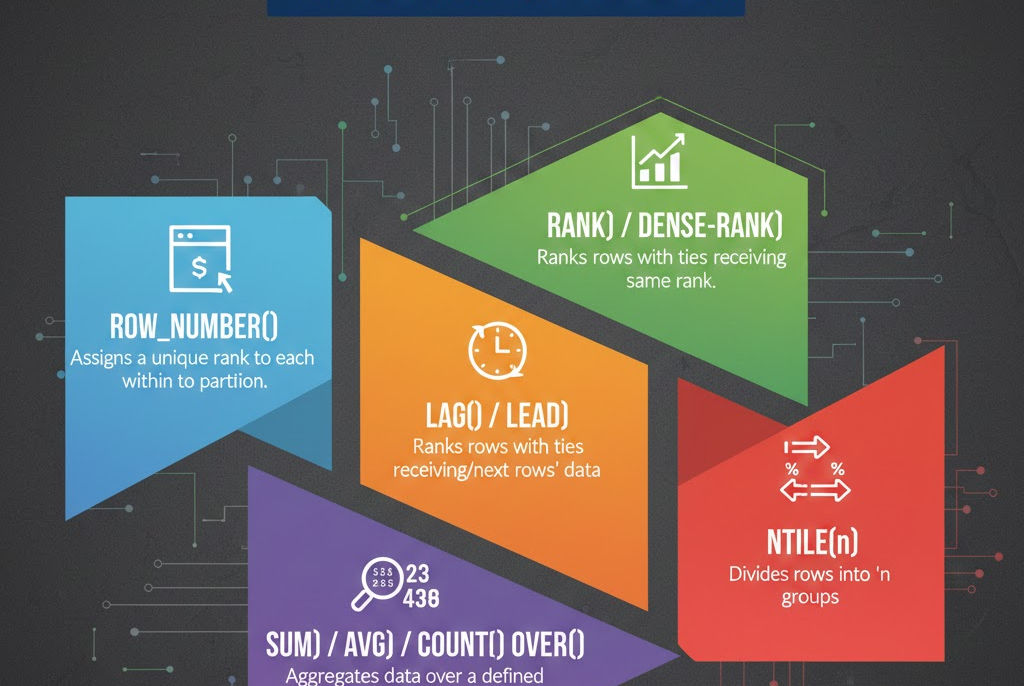
Analyze data without losing row-level detail using SQL window functions, with clear explanations and real-world business examples.
Window functions turn raw data into meaningful insights—one row at a time.
 Introduction to Window Functions in SQL
Window functions allow you to perform calculations across a set of rows related to the current row, without collapsing the result set.
Unlike GROUP BY, window functions retain row-level details, making them essential for analytics, reporting, and ranking operations.
They are widely used in US-based industries such as banking, retail, healthcare, and finance.
What Are Window Functions?
A window function performs a calculation over a “window” of rows defined by the OVER() clause.
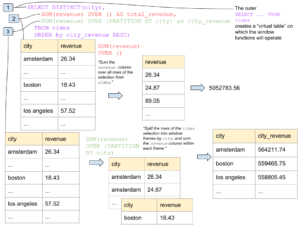
 Key Characteristics
-
Does not reduce the number of rows
-
Useful for ranking, running totals, and comparisons
-
Works alongside regular SELECT queries
Basic Syntax of Window Functions
Syntax:
SELECT column_name,
window_function() OVER (
PARTITION BY column_name
ORDER BY column_name
) AS alias_name
FROM table_name;0);
ROW_NUMBER() Explained
The ROW_NUMBER() function assigns a unique number to each row.

Syntax:
SELECT customer_id,
order_amount,
ROW_NUMBER() OVER (ORDER BY order_amount DESC) AS row_num
FROM orders;
Example:
A US retail company ranks orders by value to identify top purchases.
RANK() Explained
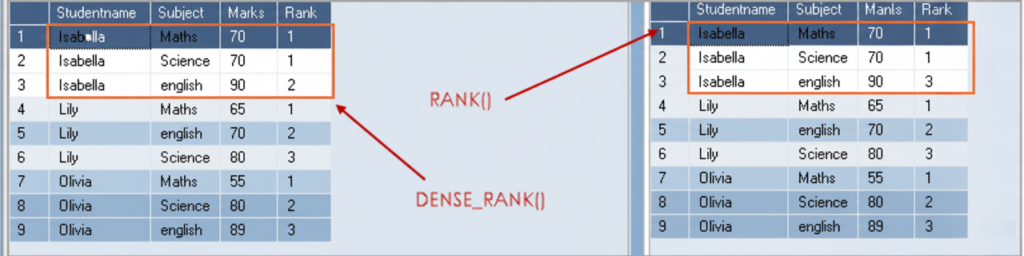
RANK() assigns the same rank to equal values but skips ranks after ties.
Syntax:
SELECT employee_name,
       salary,
       RANK() OVER (ORDER BY salary DESC) AS salary_rank
FROM employees;
Example:
A US enterprise organization ranks employees by salary for compensation analysis.
DENSE_RANK() Explained
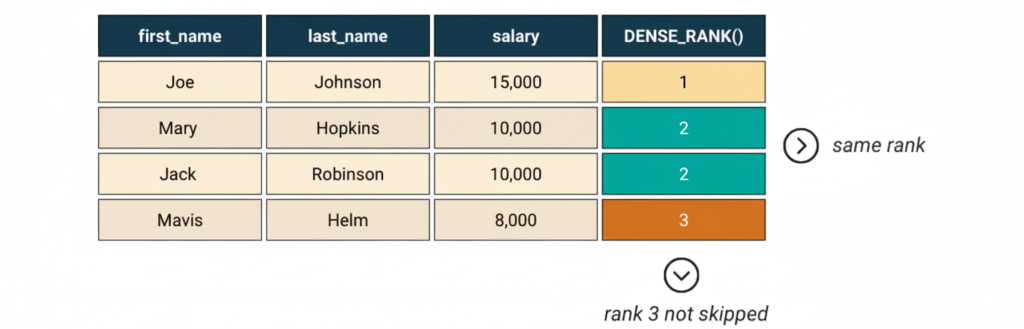
DENSE_RANK() assigns ranks without skipping numbers.
Syntax:
SELECT employee_name,
       salary,
       DENSE_RANK() OVER (ORDER BY salary DESC) AS dense_rank
FROM employees;
Example:
Used by US HR teams to rank employees fairly when salaries match.
ROW_NUMBER() vs RANK() vs DENSE_RANK()
| Feature | ROW_NUMBER() | RANK() | DENSE_RANK() |
|---|---|---|---|
| Purpose | Assigns a unique number to each row | Assigns rank with gaps | Assigns rank without gaps |
| Handling Ties | Does not consider ties | Same rank for ties | Same rank for ties |
| Gap in Ranking | No | Yes | No |
| Uniqueness | Always unique | Not unique | Not unique |
| Common Use Case | Pagination, unique row identification | Competitive ranking | Leaderboards |
| Order By Required | Yes | Yes | Yes |
| Row-Level Detail | Preserved | Preserved | Preserved |
| Business Usage | Page-wise reports | Salary rankings | Sales performance rankings |
Simple Example:
SELECT employee_name,
       salary,
       ROW_NUMBER() OVER (ORDER BY salary DESC) AS row_num,
       RANK() OVER (ORDER BY salary DESC) AS rank_val,
       DENSE_RANK() OVER (ORDER BY salary DESC) AS dense_rank_val
FROM employees;
Real-World Explanation
- ROW_NUMBER():
Used by e-commerce platforms for pagination (page 1, page 2, etc.). - RANK():
Used in corporate systems to rank employees by salary, allowing gaps. - DENSE_RANK():
Used in sales dashboards where consecutive rankings are required.
SUM() as a Window Function (Running Total)
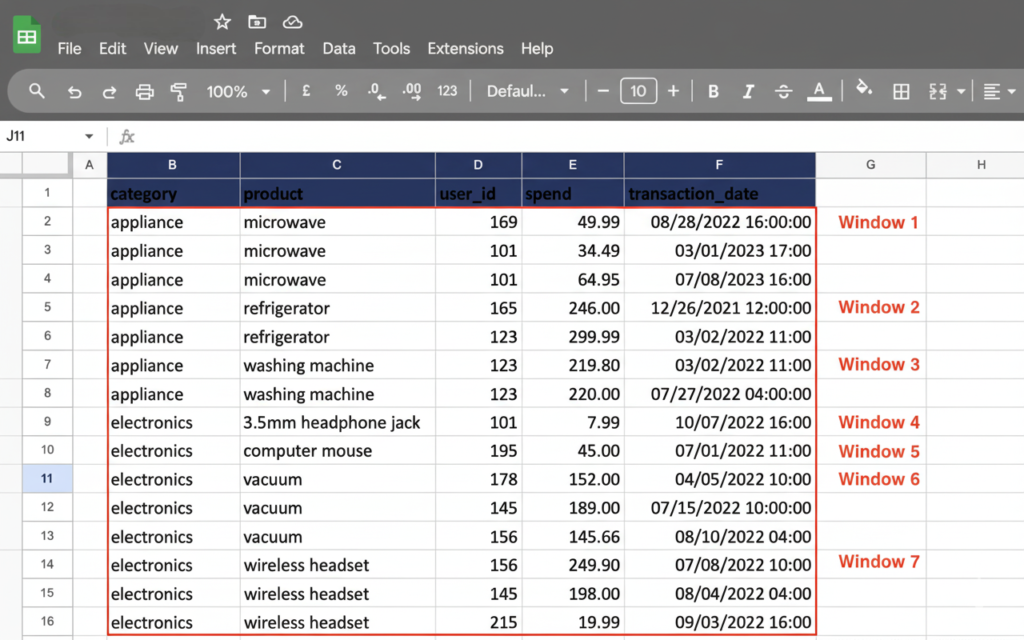
Syntax:
SELECT order_date,
       order_amount,
       SUM(order_amount) OVER (ORDER BY order_date) AS running_total
FROM orders;
Example:
A US finance team tracks daily revenue growth using running totals.
PARTITION BY Explained
PARTITION BY divides data into groups while keeping rows intact.
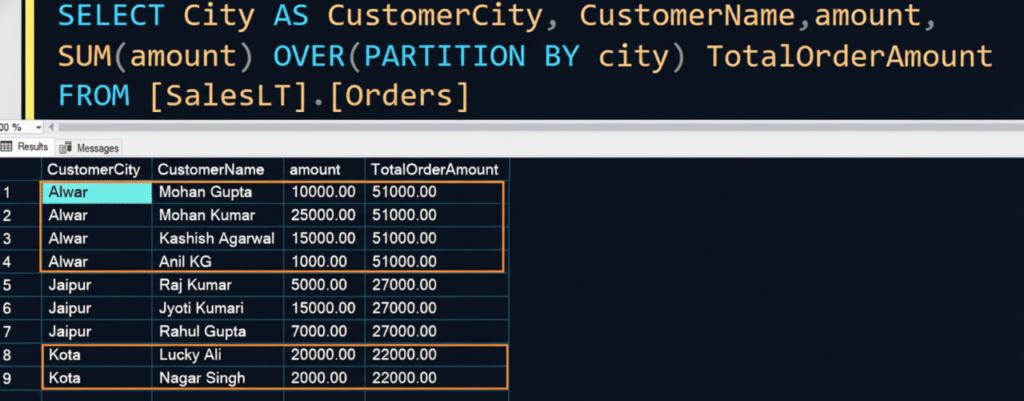
Syntax:
SELECT department,
       employee_name,
       salary,
       AVG(salary) OVER (PARTITION BY department) AS dept_avg_salary
FROM employees;
Example:
US companies compare individual salaries against department averages.
Window Functions vs GROUP BY
| Feature | Window Functions | GROUP BY |
|---|---|---|
| Row-Level Detail | Preserved | Lost |
| Aggregation | Yes | Yes |
| Ranking Support | Yes | No |
| Use Case | Analytics & reporting | Summary reports |
Real-World Scenario: Banking Analytics
Banks use window functions to:
- Rank customers by transaction volume
- Calculate running balances
- Compare daily and monthly trends
This supports fraud detection and financial insights.
Common Mistakes to Avoid
- Forgetting the
OVER()clause - Mixing GROUP BY incorrectly
- Using window functions without ORDER BY
- Overusing complex windows without indexes
Best Practices for Window Functions
- Use ORDER BY carefully
- Index columns used in partitions
- Keep queries readable
- Combine with CTEs for clarity
🔗 Official PostgreSQL Window Functions Documentation (DoFollow):
https://www.postgresql.org/docs/current/tutorial-window.html
Frequently Asked Questions (FAQs)
1. Do window functions replace GROUP BY?
No. They serve different purposes.
2. Are window functions slow?
They are efficient when indexed properly.
3. Can window functions be used in WHERE clause?
No. Use them in SELECT or ORDER BY.
4. Are window functions used in real-world systems?
Yes. They are essential in US enterprise analytics systems.
Window functions are a powerful feature of SQL that enable advanced data analysis without losing detail. From ranking employees to calculating running totals, they simplify complex analytics tasks.
Our DBS University provides a career focus SQL course which can help to make yourself industry ready.
In production environments, window functions are essential for financial reporting, performance analysis, and business intelligence. Mastering them is a key step toward becoming an advanced SQL developer or data analyst.
0 Comments